The software came first
Plain-English missions for a quadcopter. A language model picks from missions I wrote, plain code turns them into flight paths, and the drone keeps limits no plan can raise. I wrote the stack in one evening, before I'd ordered the drone.
Sky Scout turns a sentence like "search the park for a missing person" into a mission a quadcopter can fly. i wrote the whole stack in one evening in july 2025, eleven days before i ordered the drone. so how do you let a language model plan a flight without letting it decide anything that matters?
you give it four layers it can't talk its way past. it picks from missions i wrote down. every number it returns is checked by code that doesn't care how sure it sounds. the flight path is geometry you can read. and the drone keeps limits that no plan can raise.
The interesting layer sits above the flight controller
the first version of the idea, in june 2025, was a loop with four steps. you say what you want, a language model turns it into a mission, the drone flies it and looks, and it comes back and tells you what it found.
the plan then was a Crazyflie 2.1+, a drone that fits in your palm, flying indoors with no GPS, for a pitch to a research lab. my notes have a week-by-week demo for it. week one, count the cones in a field. week two, say what shape they make.
two weeks later there's a new note in the vault: "All the confusing names in 'Pixhawk' explained (Mission Planner, PX4, Ardupilot, Pixhawk etc.)". that note is the switch. indoor SLAM on a palm-size drone became outdoor GPS missions on a real airframe: a Holybro X500 with a Pixhawk 6C running PX4, the open flight stack my notes list under Amazon Prime Air and Wing.
the reasoning is in my notes on how production drones are put together. almost nobody writes the flight controller. PX4 or ArduPilot keeps the drone in the air, and the interesting work sits on top: perception, path planning, mission logic, and the software a person uses to say what they want. that layer is what Sky Scout is.
Software first, because a fake drone can fail on purpose
on july 10 2025 i started at 4:04pm. i wrote the docs first: what the nodes are, what each topic carries, what the hardware will be. by 4:28 there was an LLM agent and a fake drone to talk to. the web UI went in at 4:40, a switch between the fake drone and a real one at 4:49, and a real map at 5:38. flight patterns, eight mission templates and a weather check went in at 9:27.


software first was the part i could do that night. it also meant the parts would arrive to a stack that was already waiting for them.
the fake drone is why that worked. mock_drone.py arms, takes off, flies toward a target at 5 m/s, climbs at 3 m/s, drains its battery while armed and comes home on its own when the battery gets low. it has the same kind of failsafes a real autopilot has, and the dashboard has buttons to drop its battery or cut its GPS. so i could watch the safety logic fail, over and over, before there was anything to break.
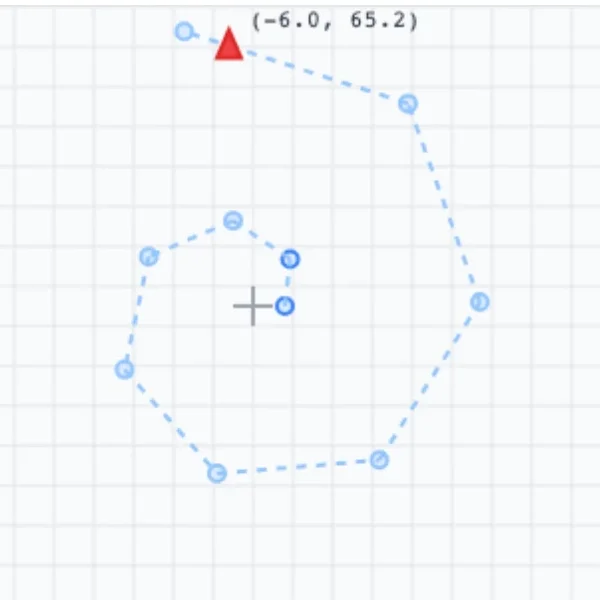
the first map was a <canvas> i drew by hand: a grey grid at two pixels per metre, a cross at the origin, the last ten waypoints as blue dots and the drone as a red triangle. fifty-eight minutes later it was a MapLibre map with real tiles, a pulsing marker and a trail.
Only one node knows a drone exists
Sky Scout is six ROS2 packages: five nodes and a bringup package that launches them. each node owns one job and talks to the others only through topics, so any of them can be swapped without the rest noticing. that matters when one of them is a fake drone that has to become a real one.


the dashboard never touches ROS directly. it talks to rosbridge over a websocket, and everything you type goes out as a string on /web_command. command_interface makes one decision: a string that starts with SIMULATE: is a test, like SIMULATE:BATTERY:15, and goes straight to the drone. anything else is a mission and goes to the language model.
llm_agent turns the sentence into a plan. it also listens to the drone's battery and position, so every prompt knows how much charge is left and where the drone is. mission_planner checks the plan, turns its pattern into waypoints and runs the mission.
navigation_bridge is the only node that knows a drone exists. it converts the planner's metres into latitude and longitude, sends commands, and publishes telemetry back ten times a second. a use_mock parameter decides what's on the other end, and the dashboard's Mock / Real switch flips it through a ROS service. nothing upstream changes when it does.
the fifth node, perception, is the slot for a camera. it reads /camera/image_raw and publishes detections on /detected_objects, which the planner already subscribes to. one launch file brings it all up: ros2 launch skyscout_bringup skyscout.launch.py.
The model picks, the code decides
here's what typing a mission looks like. the six examples on the dashboard are a missing person, a roof, vehicles, a security check, a rapid response and crops.
the agent wraps your sentence in a prompt with four parts. the live context: battery and position from the drone's own telemetry, and whether it's day or night. the exact JSON shape, with every allowed value and range spelled out. one line of guidance for each of the nine mission types and seven patterns. and the eight templates, each with the phrases that should trigger it.
it goes to GPT-4 Turbo in JSON mode, at temperature 0.3 with a 1,000-token cap. Gemini is the other provider, picked by a launch argument. Gemini has no JSON mode here, so its reply gets any markdown fences stripped, and its prompt ends with "Return ONLY the JSON, no other text."
the temperature is low because the job is closer to a lookup than to writing. the same sentence should give the same mission.
then the reply has to become a MissionPlan, a Pydantic model. this is the line between the language part and the flying part. the mission type has to be one of nine strings and the pattern one of seven. altitude, speed and the come-home battery each have a band they must land in.


120 metres is just under 400 feet, the usual legal ceiling for small drones.
if anything fails, there's no retry. a timeout, an API error, JSON that won't parse, an altitude of 300: all of them land in one handler that returns a plan i wrote, a grid search at 30 m and 5 m/s over a 100 m radius, with your sentence as the target. a retry loop would let a slow model be slow twice. this way every path out of the agent is a plan the planner can fly.
the model is good at "what did you mean", and that's the only question it gets. everything after its choice is code you can check by hand.


every line of that is checkable with a calculator. the eighth waypoint of the spiral is 7 × 72° around and 70 m out, which puts it at x = −56.6, y = 41.1. the bridge adds those metres to home at about 111,111 metres to a degree. the drone checks the result against its own fence before it moves.
Templates are numbers someone decided at a desk
there are eight templates, in mission_templates.py. each one is a whole mission: type, pattern, altitude, speed, radius, and a safety block with a geofence, a come-home battery level, a weather check and a wind limit. the prompt points the model at them by phrase. "inspect building" or "check roof" means building_inspection. "count cars" means parking_count.
the numbers follow the job. an inspection flies at 30 metres and 3 m/s in a 50 m orbit, because you want detail and time on the target. a quick search goes up to 50 metres and 8 m/s over 200 metres, because you want area. the agricultural survey is the widest, 300 metres, flown as a tight zigzag at 70.


the safety blocks follow the job too. a delivery has a 1 km fence and turns for home at 35% battery, the highest of any template. an emergency response goes the other way: 20%, a 2 km fence, 15 m/s of wind and no weather check. the comment in the code says it plainly: "Override weather for emergency."
the weather check is its own small client. it reads OpenWeather for a position and answers one question, safe_to_fly, from fixed thresholds: wind over 10 m/s, gusts over 15, visibility under 3 km, more than 2.5 mm of rain an hour, or a thunderstorm, tornado, squall or hurricane. without an API key it returns calm defaults, so nothing downstream has to handle a missing forecast.
i wanted those numbers written down by me. if a plan asks for a 2 km fence in a crosswind, someone should have decided that at a desk, and the drone's own 500 m limit still gets the last word.
inspect, flown as a circle at 30 m
The flight path is plain geometry
once there's a plan, the planner needs waypoints. there are six pattern generators in mission_planner/node.py, and each is a few lines that turn a radius and an altitude into a list of points, in metres from the launch spot. drawn here from the code at a 100 m radius, first point in blue:


they're the least clever code in the repo. you can read one and know exactly where the drone will go, and nothing about the path depends on the model.
each one fits a job. the grid is the classic survey: lanes 20 metres apart, and only the lane ends are waypoints, because the drone flies a straight line between them anyway. the zigzag is the thorough version, lanes 10 metres apart with a point every 20 metres, so the survey's 300 m radius comes out at 1,860 points. the circle is 36 points ten degrees apart, so a camera sees a building from every side. the polygon takes the plan's own vertices, or draws a hexagon when there aren't any.
the spiral has the most thought in it.


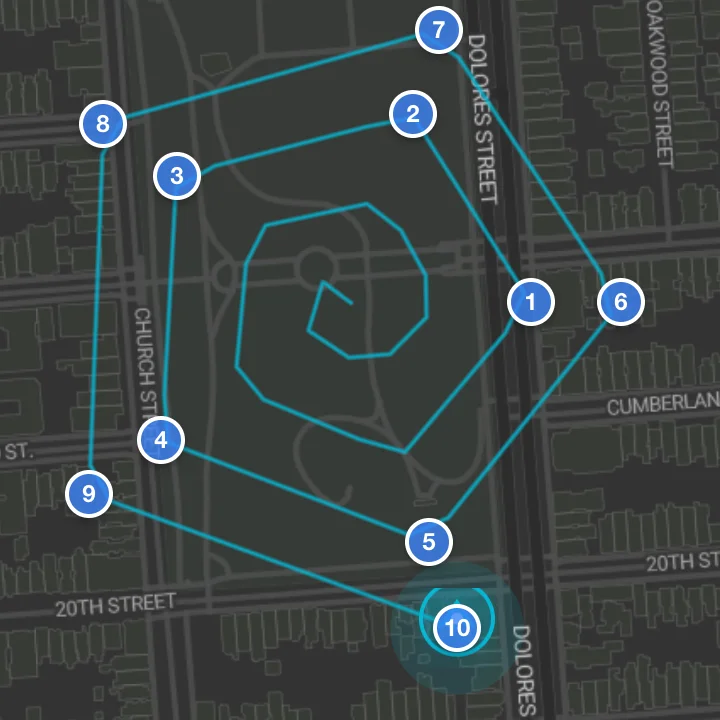
each step turns a fifth of a lap and moves out a twentieth of the radius. at the quick-search radius of 200 metres that's four laps, ten metres further out every point, starting on the spot. search uses it because someone lost was last seen somewhere. the middle is the likeliest place, so it's looked at first, and the search widens from there.
the planner runs the mission as a small state machine on a one-second timer: planning, arming, takeoff, executing, landing. each tick does the next thing and publishes the new state on /mission_status, which is the line you saw change in the recording above.
You always know which drone you're watching
the dashboard is a Next.js app, and every panel on it is a subscription. telemetry listens to battery, position, armed state and the bridge's status. the mission panel listens to /mission_plan and /mission_status. the map listens to position and waypoints.
the map works in the same local metres as everything else. it asks the browser where you are and puts home there, or in San Francisco if you say no. the trail keeps the last 100 positions, and waypoints show up as numbered markers, the last ten at a time.
it has dark and light map styles from Stadia. switching theme swaps the whole style, which drops every layer on the map, so the trail is re-added as soon as the new style loads. otherwise the drone would forget where it had been every time you changed theme.
mock mode is loud. there's a yellow SIMULATION MODE badge in the header, and the telemetry card and the map get a yellow border and a MOCK or SIMULATED tag. you should never be unsure which drone you're talking to.2
Limits no plan can raise
the plan carries its own safety numbers. under them sits a second layer that no plan can touch: the limits built into the drone.
mock_drone.py won't arm under 25% battery. it clamps any takeoff or waypoint above 120 metres down to 120. it rejects any waypoint more than 500 metres from home, and the bridge reports that back as a geofence_violation. it won't disarm more than half a metre off the ground. and while it's armed, every update checks the battery. under 20%, it switches to return-to-launch, flies home and lands.


that's why a delivery template's 1 km fence is fine to write down. the drone's own 500 m wins. a wrong plan from the model, or a wrong template from me, still can't take it past its fence or above its ceiling. a real PX4 autopilot keeps the same kind of limits as parameters on the flight controller.
the simulated battery drains at 0.1% a second while armed. from full, that's 800 seconds, 13 minutes and 20 seconds, before the drone's own failsafe turns it around. the templates ask for more margin than that: a search wants to be home by 30%.


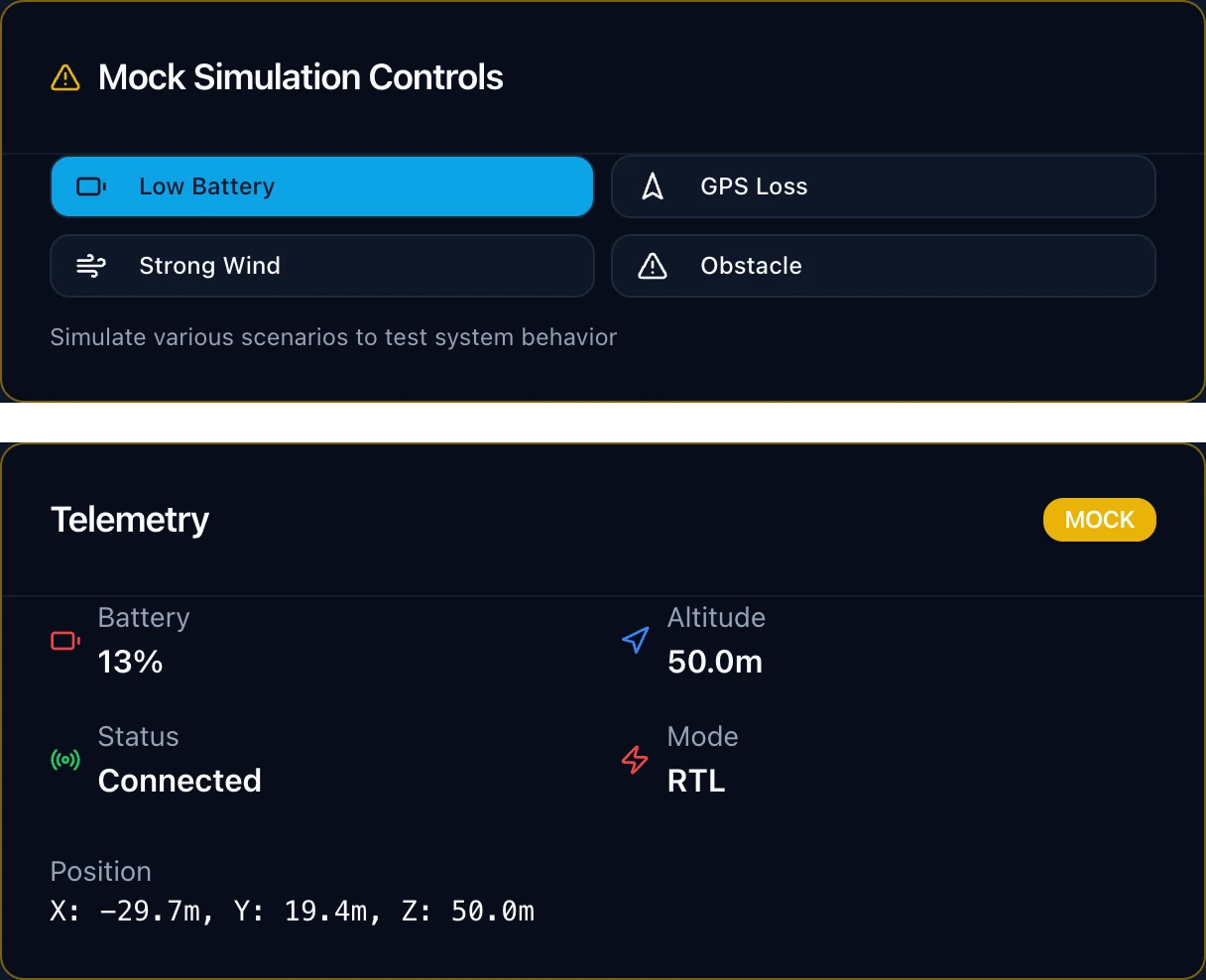
the dashboard's mock controls drive all of this. Low Battery sends SIMULATE:BATTERY:15, under the threshold, and the drone switches to RTL and heads home. GPS Loss puts it straight into land mode, the safe answer when it no longer knows where it is. Obstacle stops it where it is.
in may 2026 i came back to the repo and set up quality gates: lint, types, formatting, dead-code and React checks for the dashboard, ruff and unit tests for the Python, and a colcon build of the ROS workspace in CI. the tests cover exactly these limits: no arming under the floor, takeoff clamped to the ceiling, waypoints outside the fence rejected, low battery triggering return-to-launch.
The parts arrived to a stack that was waiting
on july 21 i bought the parts. the X500 V2 kit with the Pixhawk 6C, an M10 GPS and a telemetry radio. a Tattu 4S 5200 battery, an ELRS receiver and a RadioMaster Pocket to fly it by hand. then the extras a first build teaches you to buy, like a ShortSaver: it sits between the battery and the drone on the first power-up, so a wiring mistake blows a fuse instead of the flight controller.
the X500 is a development frame: carbon plates 144 mm square, 16 mm carbon arms, 500 mm from motor to motor, and a platform board with holes for a companion computer. the landing gear is 215 mm tall, and the GPS sits on a mast above everything so the frame and the electronics don't block its view of the sky.


the repo's hardware doc has the wiring. the Pixhawk takes the GPS, the RC receiver and the four ESCs. the wiring plan puts a Raspberry Pi 5 on its second telemetry port at 921,600 baud, as the place for the ROS nodes to live on the airframe. the receiver on RC IN means the hand radio can always take over.
the X500 flew.
the mission stack ran against the simulated drone. the two were built to meet at navigation_bridge, behind the same topics, so the planner, the agent and the dashboard stay the same whichever drone is on the other end.
the drone on this page is a three.js model of that build. buildDrone.ts is about a thousand lines of procedural geometry, true to scale, in metres, with every size taken from a parts list that cites its source: my order, Holybro's spec pages, the motor's datasheet, the battery's listing. the few the spec sheets don't give, like the GPS mast height, are marked as estimates.1
from above you can see the layout the X500 is designed around, and the prop order PX4 expects for a quad X: front-right and rear-left spin one way, front-left and rear-right the other, so the torques cancel.


The model never holds the limits
everything in Sky Scout hangs on where one line sits: MissionPlan. above it, a language model reads what you meant. below it is code i can read, numbers i wrote down, and limits the drone keeps for itself.
that's the trade. the model can't invent a new kind of mission, and it can't step outside the bands i set. in return, when it gets a sentence wrong, the worst it can do is fly the wrong mission inside the fence. the fence, the ceiling and the battery floor were never its to pick.
- the parts list tags each dimension by source. estimated: the arm-connector shapes, the GPS mast height (about 110 mm), the platform board, the telemetry box, motor height and landing-gear splay. wiring, ESCs and screws aren't modelled. ↩
- the dashboard recordings are the real Sky Scout dashboard, fed by a stand-in for rosbridge that plays the quick_search template, the planner's own status messages and its spiral waypoints, sped up. ↩