
A receipt, read twice
A 2023 class project that turns a photo of a receipt into rows you can budget against and ask questions about.
Receipts turns a photo of a receipt into rows: a merchant, and one purchase per line with a price, a quantity and one of sixteen categories. our first version asked a vision model for the store, the items and their prices in one call, with 300 tokens. the one we shipped reads every receipt twice, and a person checks the result before it's saved. how do you get numbers out of a language model that you'd actually budget against?
A class project with a gap in the market
in october 2023 our software engineering class needed a team project. the repo was called "307-project", after the course number. its banner was a file called placeholder.jpg.
we paid for each other's food a lot and wanted to keep track of it. by the time we wrote the final README, Mint had announced it was shutting down, and the README says so plainly: "since the popular app Mint closed down, there's a gap in the market."
the idea fits in a sentence. take a photo of a receipt, get the merchant, the items, the prices and a category, and keep them somewhere you can ask questions. "how much did i spend on groceries last month?" should just work.
four of us built it. i set up the repo and its process: by november 10 it had a GitHub Actions workflow that installs, builds and tests on every push and pull request to main. the day before the demo i built the Next.js app that's still online, and the chat.
our python backend, carried over from our databases class, moved into a folder called backend-old. the new app's stack was Next.js, tRPC, Drizzle on PlanetScale, Clerk and UploadThing. tRPC shares types between the server and the pages, and Drizzle derives them from the schema, so changing a column shows up as a type error in the frontend.
every table got the prefix csc_480_. that's a third class, AI.
on demo day i rewrote the README around Mint and added the Figma wireframes to the repo, and we added pytest suites for the old backend and Cypress tests for the new one.
Eight boxes on the plan, three tables in the app
on october 31 i committed our data model as a class diagram. it had users, transactions, purchases, receipts and categories, plus financial goals, financial recommendations and notifications.
the version we shipped kept the core of that plan in three tables.


a purchase is the unit that matters. it has an item, a price, a quantity and a category, and it points at the receipt it came from. everything else in the app, the budgets and the chat, is a query over purchases. so the whole product depends on getting purchases out of a photo correctly.
the wireframes came out of Figma under the name "Receipt Tracker". the one that survived best is the detail view, with the photo on the left and its fields on the right. here are the two field columns, planned and shipped.
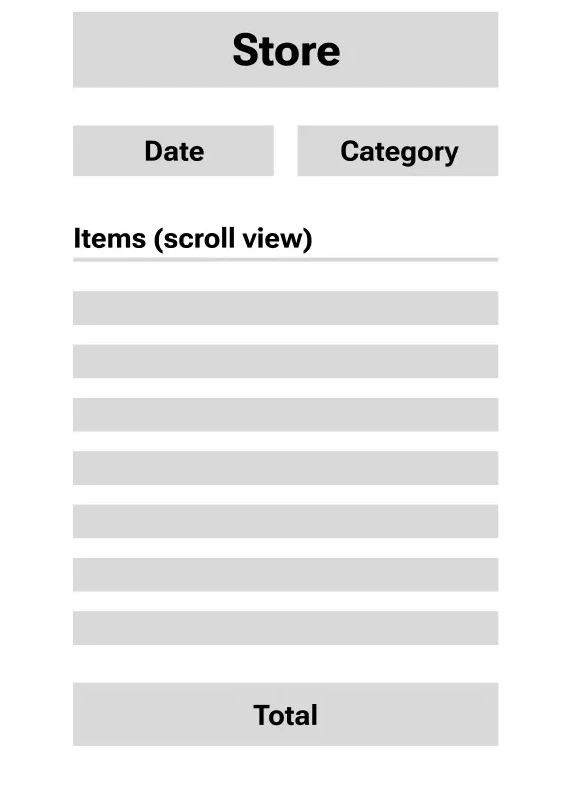
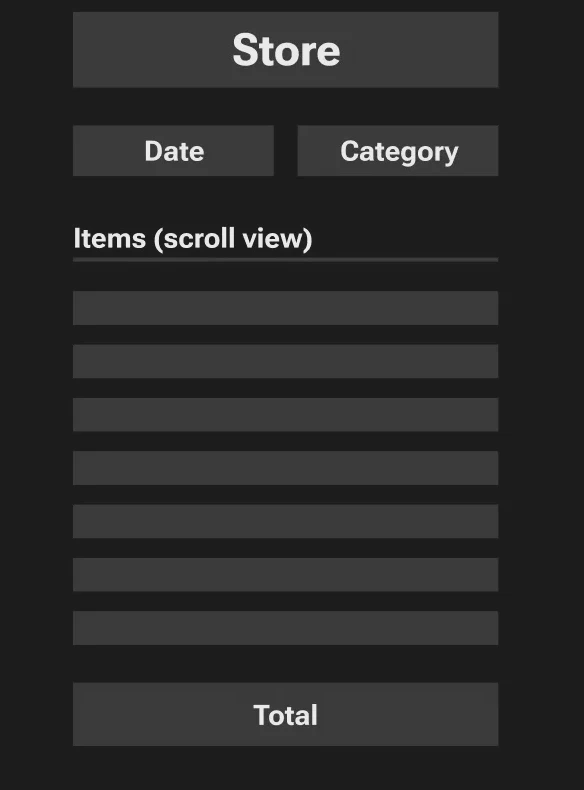
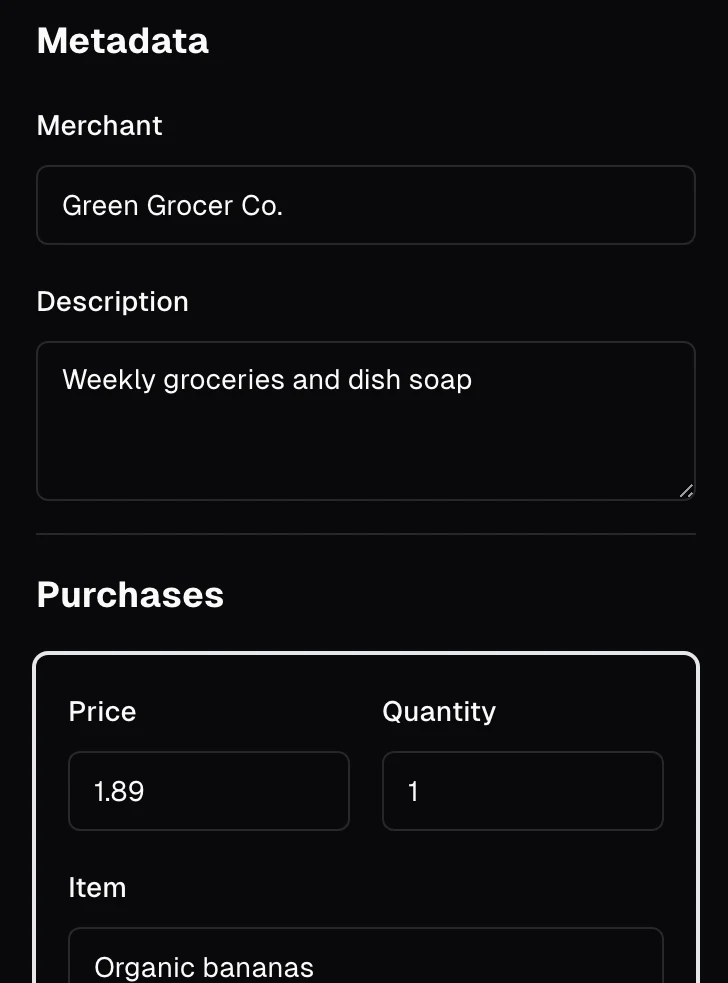
the shipped page keeps that layout. what changed is on the right: a category on every purchase instead of one per receipt, and an Extract button that fills the fields in.
One call, then two
the moment it first worked was a teammate's commit on november 16: "s3 upload works, openai parsing works pretty well, db insertion works well".
that version lived in our python backend. it uploaded the photo to S3 and sent it to gpt-4-vision-preview with one instruction: "return the information in this receipt as neatly formatted JSON. Only return store name, date, all items and their associated price and quantity." it had 300 tokens to answer. the server split the reply on the code fences, parsed what was inside, and wrote a transaction and its purchases straight into the database.
a photo went in and rows came out. it proved the idea, and it told us what the next version needed.
the prompt has no word for a category, so every november row was saved with an empty one. a row without a category can't count against a groceries budget. the reply was text, so the code had to find the JSON inside it. and nothing stood between the model and the database.
the rebuild landed three weeks later, on december 7, the day before the demo.


teammates landed the new server at 2:57pm, the two-pass extraction at 3:21pm and budgets at 4:33pm. the 6:16pm commit is mine, "frontend overhaul and components": Next.js, Clerk sign-in, the landing page, the receipts list, the upload dialog, the budget pages and the chat, on shadcn components with Tremor for the charts. the form next to the photo followed at 9:07pm.
the 3:21pm commit is the split. this is its contract next to november's, both as written in the code, with the same receipt going into each.


the first call is asked to read and decide at once, in 300 tokens, and its answer has whatever shape the model gives it. in the rebuild, the first call only reads. the second only fills in fields whose names and allowed values are written down in code. neither has to be good at the other's job, and the step that writes to the database is a person.
Pass one copies the paper
it starts with the upload. you drop in a photo, up to 4MB. the upload route checks that you're signed in, stores the image and creates a receipt with the merchant set to "Unknown". the receipt exists before anything has read it, so a slow or failed read never loses the photo.
the Extract button on the receipt page is where the two passes happen.


the vision model gets the photo and one instruction: "Please write the contents of this receipt in Markdown. Make sure to include all key details." no schema and no categories. it gets up to 4,000 tokens, more than thirteen times the november budget, and all it has to do is get the text off the paper.
Markdown is a good middle format. a receipt is already a list with prices on the right, and a table keeps each item next to its price. the store name stays at the top, so the second pass gets the merchant and every line without looking at a pixel.
Pass two fills in a form
the Markdown goes to gpt-3.5-turbo, a cheaper text model, since the hard part (reading) is done. it gets one tool, extract_receipt_details, and tool_choice forces the call. the model can't answer in prose. it has to fill in a merchant, a short description and a list of purchases.
only three fields are required on a purchase: the price, the quantity and the category. the item name is optional, so a line printed as a product code still counts as long as it has a price. and the category isn't free text. it's an enum of sixteen values.
this is what a correct form looks like for that receipt, worked out by hand from the paper.


the seven prices add up to 37.48, the subtotal on the paper. the quantities add up to 8, which matches "ITEMS 8". tax and the total aren't purchases, so they don't become rows. the oat milk is one row with a quantity of 2 and a price of 8.58, the way the receipt prints it.
the tool's arguments then go through a zod schema, ReceiptExtractionSchema. if they parse, they still don't go into the database. they fill in the form next to the photo, one card per purchase, each with a category dropdown. that's the recording at the top: seven cards, then the dish soap, filed under Home and garden.
you check the cards, fix what's wrong and press Submit. submit replaces the receipt's purchases with whatever is in the form, so what you saw is what gets stored.
saved receipts land in the receipts list: search by merchant, sort by date or merchant, ten to a page by default. the table keeps its state in the url, so a filtered view survives a refresh.
Sixteen categories, one constant
the class diagram had categories as a table. in the app they're a list in code: one constant, CATEGORIES, in the database schema file.


that one constant is the MySQL enum on the purchases table, the enum in the extraction tool, the enum in the chat's functions and the options in the dropdown. the budgets table has one column for each.
so the model can't invent a category the database would reject, and the dropdown can't offer one the chat doesn't know about. "Dish soap" can land in home_and_garden, but it can't land in "household stuff".
Questions become queries
the chat is the part of the plan from day one: "how much did i spend on…". i wrote it, the server route and the page.
it doesn't guess at your spending. the model gets five functions: a category's budget (total or remaining), spend in a category, the last ten purchases in a category, your latest receipt from a merchant, and calculate_sum. it picks one. the server runs it as a database query joined to your receipts and scoped to your user id, and the model writes its answer from the rows that come back.
budgets are one row per person, with sixteen columns, one per category, each starting at $100. the row is created the first time you open the budget page.
here's one question all the way down, on the made-up receipt and an earlier one from the same store.


"remaining" is a subtraction the server does, not the model: the budget column minus the sum of that category's purchases. the dish soap isn't in the 64.83, because it's home_and_garden.
calculate_sum exists for the same reason. it adds up a list of numbers, so even a total the model needs mid-answer comes from code.
the chat uses gpt-3.5-turbo with OpenAI's function calling. after a function runs, its result goes back into the conversation and the model is called again with the same functions, so one question can become a lookup and then a sum. the route streams the answer with the Vercel AI SDK.
those rows are only ever yours: every query on receipts checks this receipt id and this user id, and purchases inherit the check through their receipt.
a budget is only as good as the rows under it, and a row is only as good as the last person who looked at it. so in Receipts the model never gets the last word on a number. it reads the receipt. you sign it.1
- the recordings and worked examples run the 2023 code locally on a made-up receipt, with the model calls stubbed. the chat's reply is templated from the server's numbers. the figures quote the prompts and schemas from the repo. ↩